

Test splitting and parallelism
Use parallelism and test splitting to:
-
Reduce the time taken for the testing portion of your CI/CD pipeline.
-
Specify a number of Executors across which to split your tests.
-
Split your test suite using one of the options provided by the CircleCI CLI: by name, size or by using timing data.
If you are interested to read about concurrent job runs, see the Concurrency Overview page.
On CircleCI Server, use circleci tests glob and circleci tests split. circleci tests run is not supported on CircleCI Server. See The tests split command below.
|
Introduction
Pipelines are often configured so that a set of tests are run each time code is committed. The more tests your project has, the longer it will take for them to complete using a single compute resource. To reduce this time, you can split your tests and run them across multiple, parallel-running execution environments. Test splitting is a great way to speed up the testing portion of your CI/CD pipeline.
CircleCI test splitting lets you intelligently define where splits happen across a test suite:
-
By name
-
By size
-
Using timing data
It is also possible to use the CLI to manually allocate tests across parallel environments.
Quickstart
The following how-to guide walks you through the following:
-
Steps required to glob your test files.
-
Split your tests evenly across parallel containers or VMs.
-
Run your tests in parallel.
Specify parallel environments for a test job
Test suites are conventionally defined at the Job level in your .circleci/config.yml file.
The parallelism key specifies how many independent executors are set up to run the job.
To run a job’s steps in multiple, parallel execution environments, set the parallelism key to a value greater than 1. In the example below, parallelism is set to 4, meaning four identical execution environments will be set up for the job, in this case, four Docker containers using the cimg/base:2023.09 image.
Use the circleci tests split command to split your tests, then run them. Your tests will be split up, and a portion of your tests run in each execution environment. This reduces the overall time taken to run the full test suite.
# ~/.circleci/config.yml
jobs:
  build:
    docker:
      - image: cimg/go:1.18.1
    parallelism: 4
    resource_class: large
    steps:
      - run: go test -v $(go list ./... | circleci tests split --split-by=timings)
Use parallelism with self-hosted runners
To use parallelism with jobs that use Self-Hosted Runners, ensure that you have at least two runners associated with the resource class that your job uses. If you set the parallelism value to be greater than the number of active runners, the excess parallel tasks will queue until a runner is available.
If you are using parallelism on Container Runner, you will need to make sure that agent.maxConcurrentTasks and your Kubernetes cluster can accommodate the number of parallel tasks you want to run. If you do not have adequate resources, your parallel runs will be subject to queuing.
For more information, see the Configuration Reference page.
How test splitting works
CircleCI’s intelligent test splitting allows you to:
-
Specify a number of identical execution environments for a job.
-
Split your test suite into buckets so that the tests can be run in parallel on your configured execution environments.
Test splitting reduces the length of time taken for testing in your pipelines.
You can split your tests up in a few different ways:
-
Alphabetically, by name, which is the default.
-
By size, with the
--split-by=filesizeflag. -
By using historic timing data, with the
--split-by=timingsflag.
See The tests split command for an example.
CircleCI attempts to detect the granularity of the test split (for example, to split by file name, or down to class name) based on the input to the split command. You may need to choose a different timing type depending on how your test coverage output is formatted, using the --timings-type option. Valid timing types are:
-
name- test name -
classname- class name -
file- file name
Example using timing-based test splitting
Using timing-based test splitting, timing data from the previous test run is used to split a test suite as evenly as possible over a specified number of test environments. This delivers the lowest possible test time for the compute power in use.
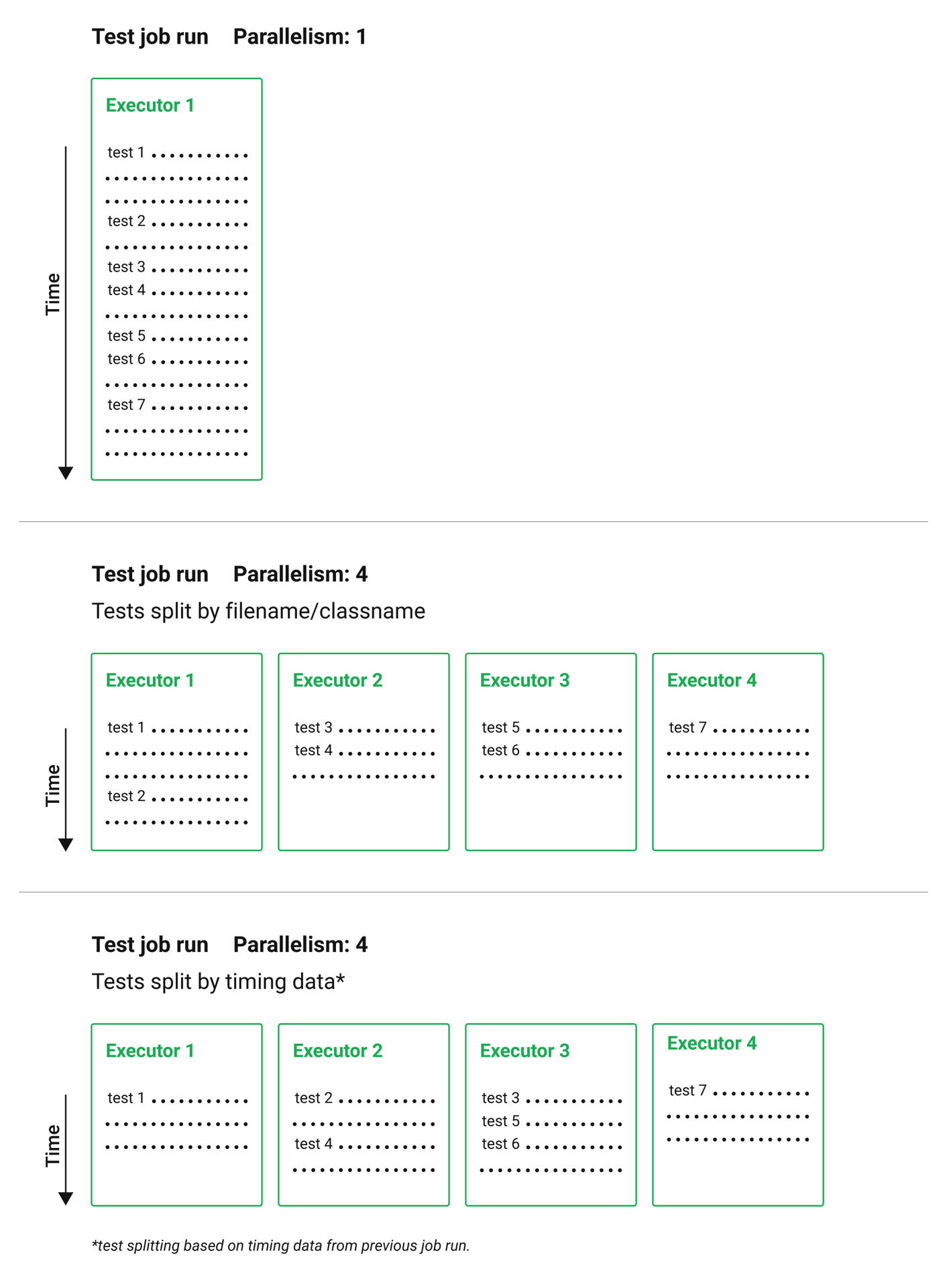
Timings-based test splitting gives the most accurate split, and is guaranteed to optimize with each test suite run. The most recent timings data is always used to define where splits are made.
As an example, take a Go test suite. Here, all tests run sequentially in a single test environment, a Docker container:
jobs:
  build:
    docker:
      - image: cimg/go:1.18.1
    resource_class: large
    steps:
      - run: go test
To split these tests using timing data:
-
Introduce parallelism to spin up a number of identical test environments (four in this example).
-
Use the
circleci tests splitcommand, with the--split-by=timingsflag to split the tests evenly across all executors.
# ~/.circleci/config.yml
jobs:
  build:
    docker:
      - image: cimg/go:1.18.1
    parallelism: 4
    resource_class: large
    steps:
      - run: go test -v $(go list ./... | circleci tests split --split-by=timings)
The first time the tests are run there will be no timing data for the command to use, but on subsequent runs the test time will be optimized.
The tests split command
It is also possible to split tests using the circleci tests split command. Using the example from above, splitting the Go tests would be done as follows:
jobs:
  build:
    docker:
      - image: cimg/go:1.18.1
    parallelism: 4
    resource_class: large
    steps:
      - run: go test -v $(go list ./... | circleci tests split --split-by=timings)
For usage steps, see Use the CircleCI CLI to Split Tests.
JUnit XML report formatting
In order to use the test splitting feature, CircleCI requires test results to be uploaded as JUnit XML reports. The following formatting allows CircleCI to parse timing data from test results and use the data for test splitting:
-
The
fileattribute, either on the<testsuite>or<testcase>tag. -
The
timeattribute, on the<testcase>tag.
The following example is a snippet from an XML file with a format that CircleCI can parse:
<?xml version="1.0" encoding="UTF-8"?>
<testsuites name="Mocha Tests" tests="3" failures="1">
  <testsuite tests="3">
    <testcase classname="foo1" name="ASuccessfulTest" time="10" file="src/__tests__/App.test.js" />
    <testcase classname="foo2" name="AnotherSuccessfulTest" time="5" file="src/__tests__/App.test.js" />
    <testcase classname="foo3" name="AFailingTest" time="1.1050" file="src/__tests__/App.test.js">
        <failure type="NotEnoughFoo"> details about failure </failure>
    </testcase>
  </testsuite>
</testsuites>
Manual allocation
For full control over how tests are split across parallel executors, CircleCI provides two environment variables that you can use in place of the CLI to configure each container individually.
-
$CIRCLE_NODE_TOTALis the total number of parallel containers being used to run your job. -
$CIRCLE_NODE_INDEXis the index of the specific container that is currently running.
The CLI looks up the number of available execution environments ($CIRCLE_NODE_TOTAL), along with the current container index ($CIRCLE_NODE_INDEX). Then, it uses deterministic splitting algorithms to split the test files across all available containers.
The number of containers is specified by the parallelism key in the project configuration file.
The current container index is automatically picked up from the $CIRCLE_NODE_INDEX environment variable, but can be manually set by using the --index flag.
cat test_filenames.txt | circleci tests split --index=0 --split-by=name > index0.txtRefer to the Project Values and Variables page for more details.
Other ways to split tests
Some third party applications and libraries might help you to split your test suite. These applications are not developed or supported by CircleCI. Check with the owner if you have issues using it with CircleCI. If you are unable to resolve the issue you can search and ask on our forum, Discuss.
- PHPUnit Finder
-
A helper CLI tool that queries
phpunit.xmlfiles to get a list of test filenames and print them. PHPUnit Finder is useful if you want to split tests to run them in parallel based on timings on CI tools. - go list
-
Use the built-in Go command
go list ./...to glob Golang packages. This allows splitting package tests across multiple containers.go test -v $(go list ./... | circleci tests split) - Playwright
-
A framework for web testing and automation and allows running sharded tests out of the box. For more details see Playwright docs.
job-name:
  executor: pw-focal-development
  parallelism: 4
  steps:
    - run: SHARD="$((${CIRCLE_NODE_INDEX}+1))"; npx playwright test --shard=${SHARD}/${CIRCLE_NODE_TOTAL}