

Pull request build settings
The settings described on this page control which pull requests CircleCI builds, and what builds from forked repositories can access. For tips on building open source projects, see the Build Open Source Projects page.
Only build pull requests
Building every commit from every branch might be excessive and costly, both in terms of time and credits usage.
You can modify this behaviour by restricting builds to branches that have pull requests.
-
GitHub App
-
GitHub OAuth app & Bitbucket Cloud
-
GitLab
-
Cursor Origin
-
In the CircleCI web app, select your org from the org cards on your user homepage.
-
Select Projects from the sidebar and locate your project from the list. You can use the search to help.
-
Select the ellipsis

 next to your project and select Project Settings.
You can also access project settings from each project overview page using the Settings button. -
In the sidebar, click Project Setup.
-
Find your pipeline and select the trigger you want to edit, or add a new trigger.
-
In the Run on dropdown list, select PR opened or pushed to, default branch and tag pushes.
-
In the CircleCI web app, select your org from the org cards on your user homepage.
-
Select Projects from the sidebar and locate your project from the list. You can use the search to help.
-
Select the ellipsis
next to your project and select Project Settings.You can also access project settings from each project overview page using the Settings button. -
In the sidebar, click Advanced.
-
Enable the Only build pull requests option.
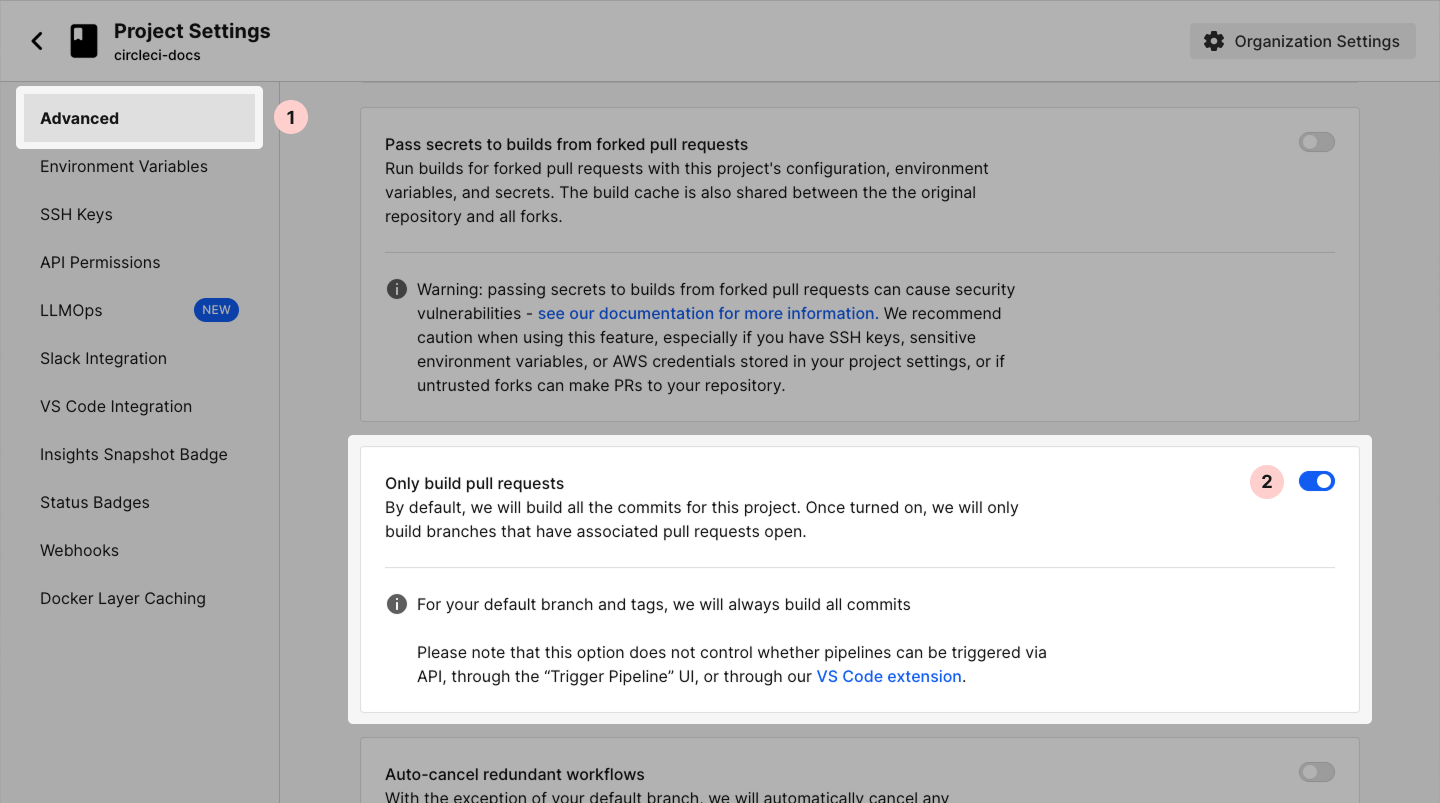
The ability to override the Only build pull requests setting is also supported. Specifically, CircleCI will run validation on all commits from additional, non-default branches that are specified via regular expression (for example, release.\*).
Override the Only build pull requests setting by utilizing the API and following the steps outlined in this support article.
Enabling Only build pull requests may result in duplicate builds. You can find troubleshooting steps in this support article.
| CircleCI will always build all commits from your project’s default branch and tags regardless of any setting. |
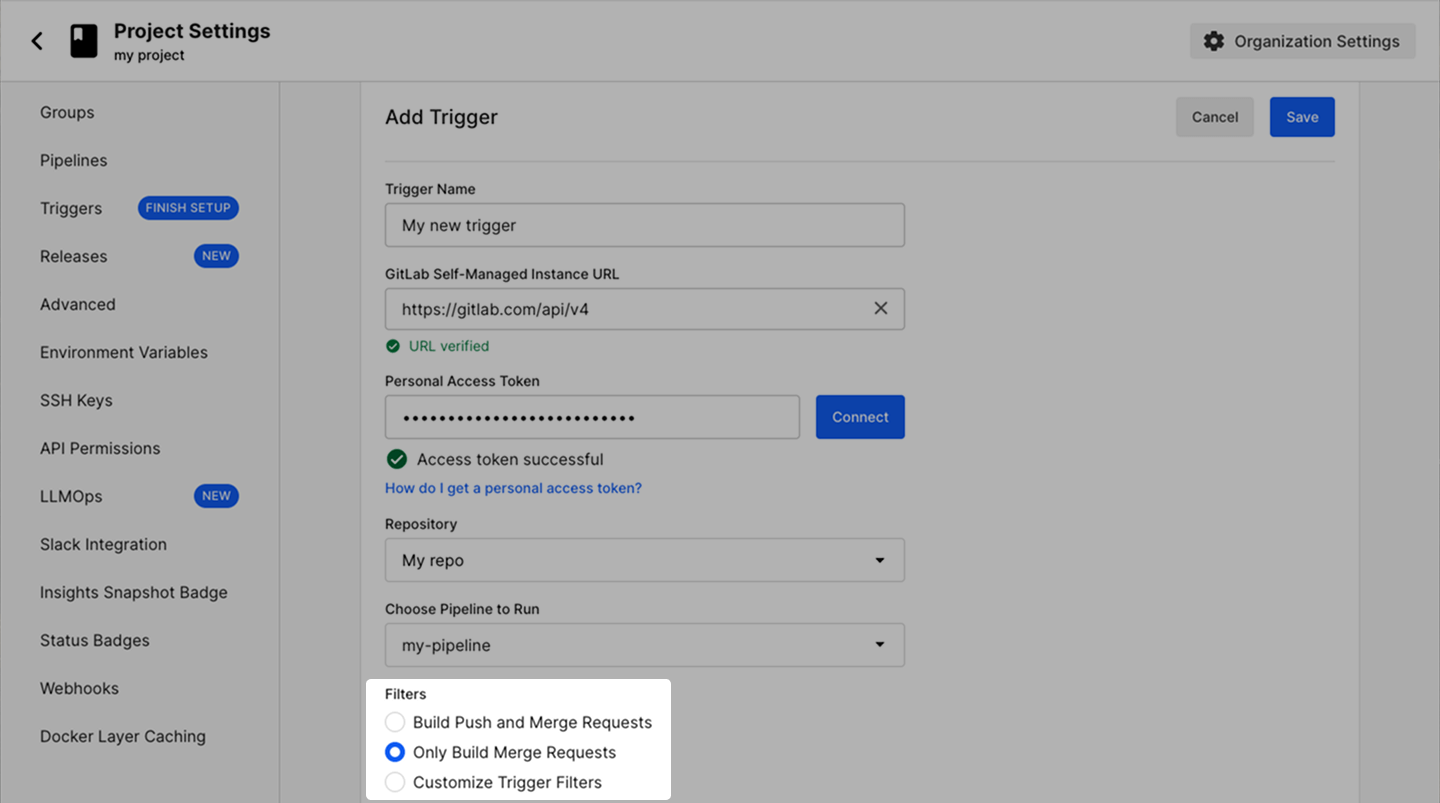
| Although the Add/Edit Trigger pages in GitLab Cloud and GitLab self-managed slightly differ, the following steps apply to both integrations. |
-
In the CircleCI web app, select your org from the org cards on your user homepage.
-
Select Projects from the sidebar and locate your project from the list. You can use the search to help.
-
Select the ellipsis
next to your project and select Project Settings.You can also access project settings from each project overview page using the Settings button. -
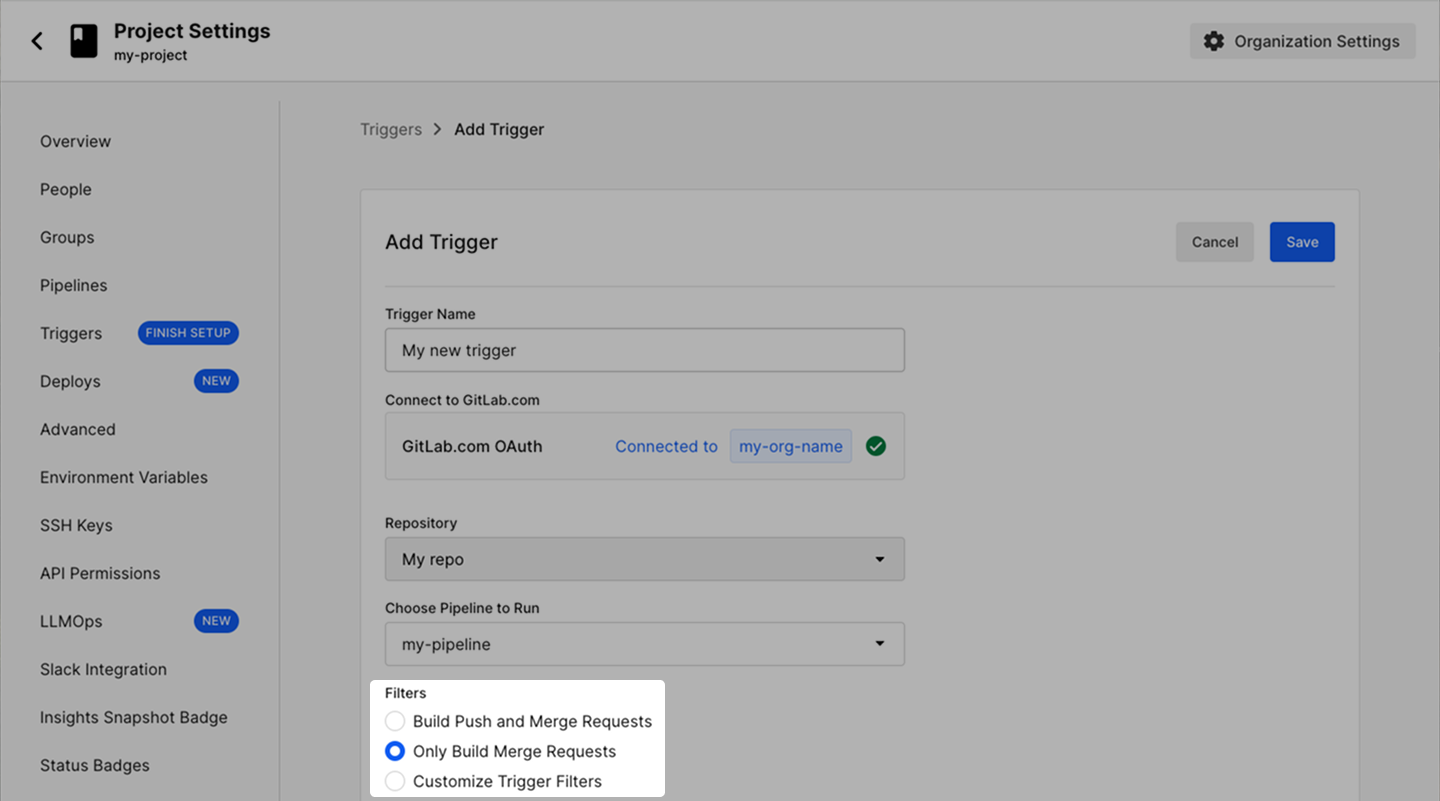
In the sidebar, click Triggers.
-
Edit an existing GitLab trigger or add a new GitLab trigger.
-
In the Filters section, select Only Build Merge Requests.
| The Cursor Origin integration is in beta. |
-
In the CircleCI web app, select your org from the org cards on your user homepage.
-
Select Projects from the sidebar and locate your project from the list. You can use the search to help.
-
Select the ellipsis
next to your project and select Project Settings.You can also access project settings from each project overview page using the Settings button. -
In the sidebar, click Project Setup.
-
Find your pipeline and select the trigger you want to edit, or add a new trigger.
-
In the Run on dropdown list, select PR opened or pushed to, default branch and tag pushes.
For the full list of trigger event options available for Cursor Origin, see the Cursor Origin Trigger Event Options page.
Build pull requests from forked repositories
|
This feature is supported for orgs that use OAuth authentication. Check your Organization slug at . OAuth authenticated orgs are structured as follows:
This feature is not supported if your organization slug is in the following format:
For an overview of feature support, see the VCS Integration Overview page. |
Many open source projects accept PRs from forked repositories. Building these PRs is an effective way to catch bugs before manually reviewing changes.
By default, CircleCI does not build PRs from forked repositories. To change this setting, go to the of your project and set the Build forked pull requests option to On.
Sometimes a user submits a pull request to your repository from a fork, but no pipeline is triggered. This usually happens because the user is following a project fork on their personal account rather than the project itself. As a result, jobs trigger under the user’s personal account instead of the organization account. To resolve this issue, have the user unfollow their fork of the project on CircleCI and instead follow the source project. This causes their jobs to run under the organization when they submit pull requests.
Pass secrets to builds from forked pull requests
|
This feature is supported for orgs that use OAuth authentication. Check your Organization slug at . OAuth authenticated orgs are structured as follows:
This feature is not supported if your organization slug is in the following format:
For an overview of feature support, see the VCS Integration Overview page. |
Running an unrestricted build in a parent repository can be dangerous. Projects often contain sensitive information, and this information is freely available to anyone who can push code that triggers a build.
By default, CircleCI does not pass secrets to builds from forked PRs for open source projects and hides four types of configuration data:
-
Environment Variables set through the application.
-
Passphraseless private SSH keys you have Added to CircleCI to access arbitrary hosts during a build.
-
AWS Permissions and configuration files.
Forked PR builds of open source projects that require secrets will not run successfully on CircleCI until you enable this setting.
If you wish to use OpenID Connect in your project, the OIDC tokens will only be generated if you have this setting turned on. This prevents your token data being shared with forked builds unless you require it. If you use OIDC with open source projects and enable the Pass secrets to builds from forked pull requests option, you must check the repository claims in your policies. For $CIRCLE_OIDC_TOKEN_V3, check oidc.circleci.com/checkout-source. If your pipeline configuration comes from a different repository than the code it checks out, also check oidc.circleci.com/config-source. For $CIRCLE_OIDC_TOKEN and $CIRCLE_OIDC_TOKEN_V2, check oidc.circleci.com/vcs-origin. This avoids forked builds having access to resources outside those that you require. For more information on OIDC, see the Using OpenID Connect Tokens in Jobs page.
If you are comfortable sharing secrets with anyone who forks your project and opens a PR, you can enable the Pass secrets to builds from forked pull requests option:
-
Navigate to the page in the CircleCI web app for your project.
-
Set the Pass secrets to builds from forked pull requests option to On.
Caching in forked pull request builds
Caches are isolated based on GitHub Repo for PRs. CircleCI uses the GitHub repository-id of the originator of the fork PR to identify the cache.
-
PRs from the same fork repo will share a cache. For example, PRs from the main repo share a cache with the main repo branches (in particular the
mainbranch). -
Two PRs in different fork repos will have different caches. That means that a PR from a fork will not share a cache with the main repo
mainbranch. -
Enabling the passing of secrets to build from forked pull requests will enable cache sharing between the original repo and all forked builds.
When you do not pass secrets to builds from forked pull requests, the first build from each fork starts with an empty cache. CircleCI does not copy caches from the original repository into a fork’s cache.