
Trigger and event recipes
These recipes show how to run pipelines and workflows in response to pull request events and schedule triggers. They use trigger options and pipeline values that are available on CircleCI Cloud only.
Trigger a pipeline when a PR is marked ready for review
Goal
You may want to run a set of high credit-consuming tests only when a pull request is ready to be taken out of "draft" — marked as ready for review. To do this, set up a trigger for your pipeline that triggers when a pull request is marked ready for review, as follows:
Steps
-
Set up a GitHub App pipeline you want to trigger when a PR is marked ready for review. Steps for setting up a pipeline are available in the Pipelines Overview page.
-
Set up a trigger for your pipeline and select PR marked ready for review under the Run on menu. Steps for setting up a trigger are available in the Set Up Triggers page.
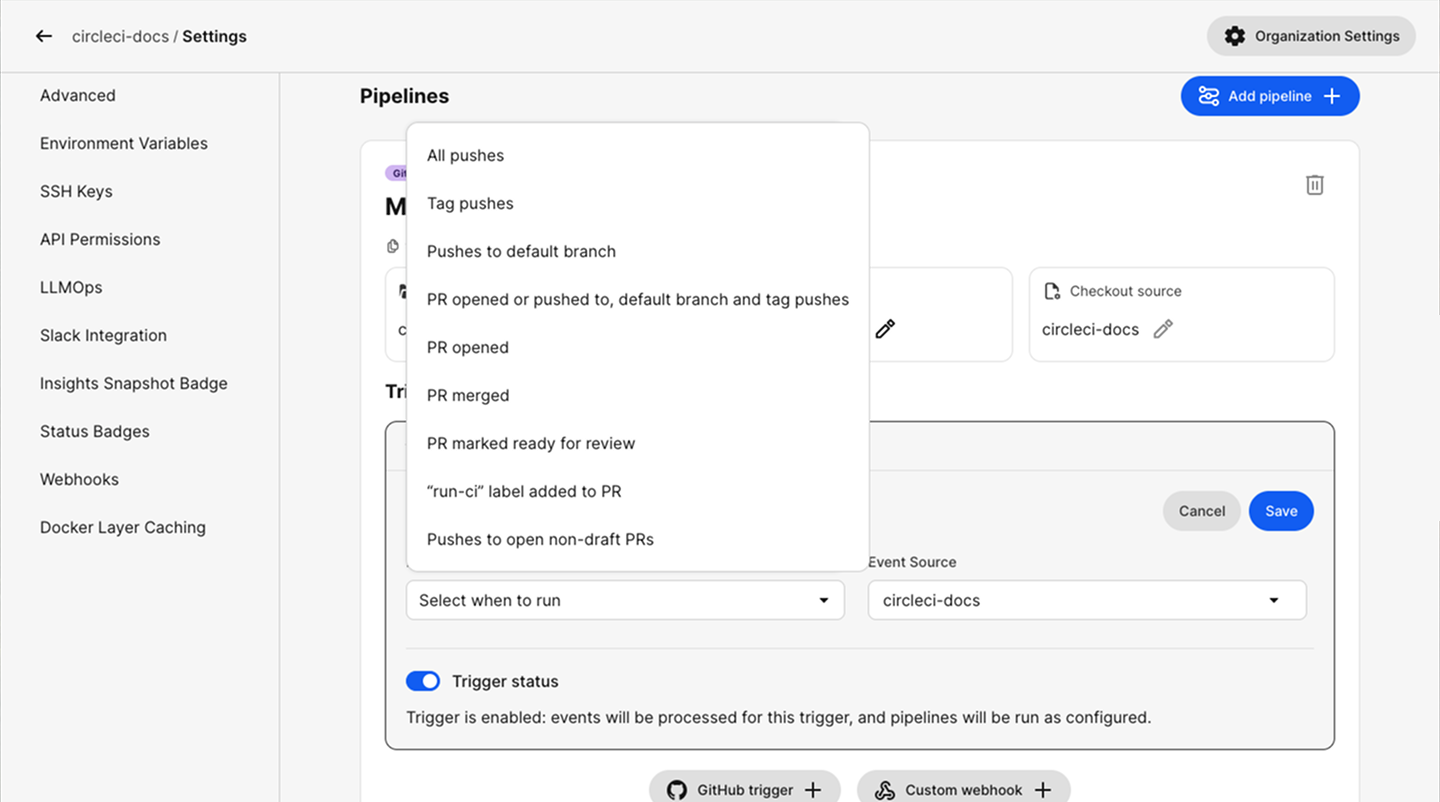 Figure 1. Run on trigger options for GitHub App triggers
Notes
-
This option is only available for GitHub App pipelines. If you have a GitHub OAuth integration you can install the GitHub App into your GitHub org and then create GitHub App pipelines. Installing the GitHub App is a quick one-time action, as described in the Using the CircleCI GitHub App in an OAuth Organization page.
Trigger a pipeline when a PR is merged
Goal
You may want to trigger a specific pipeline when a pull request is merged, for example, to run clean-up/teardown scripts. To do this, set up a trigger for a "clean-up" pipeline that is triggered when a pull request is merged.
Steps
-
Set up a GitHub App pipeline you want to trigger when a PR is merged. Steps for setting up a pipeline are available in the Pipelines and Triggers Overview page.
-
Set up a trigger for your pipeline and select PR merged under the Run on menu. Steps for setting up a trigger are available in the Set Up Triggers page.
Figure 2. Run on trigger options for GitHub App triggers
Notes
-
This option is only available for GitHub App pipelines. If you have a GitHub OAuth integration you can install the GitHub App into your GitHub org and then create GitHub App pipelines. Installing the GitHub App is a quick one-time action, as described in the Using the CircleCI GitHub App in an OAuth Organization page.
Run a workflow only when a pull request is opened
Goal
You may want to configure a workflow in your pipeline that will only run on a pipeline that is triggered when a pull request is opened. To do this you can use a workflow filter.
Steps
-
Update your CircleCI config to include a workflow that you only want to run when a PR is opened.
workflows:
  workflow-pr-open:
    # Only run this workflow when a PR is opened
    when: pipeline.event.name == "pull_request" and pipeline.event.action == "opened"
    jobs:
      - my-job-1
      - my-job-2
Notes
-
The
pipeline.event.nameandpipeline.event.actionvalues are not available for GitLab pipelines. Available action values vary by VCS provider. See Pipeline Values and Parameters for a full list of available values and supported integrations.
Combine pipeline parameters with event filters in workflow conditions
Goal
You may want to configure a workflow that runs when a specific event occurs (such as a push or pull request) or when a pipeline parameter is set to true. To combine pipeline parameters with event filters in a workflow when clause, write the condition as a direct expression without << >> delimiters.
The when clause accepts an expression as its argument. The expression is evaluated to a boolean value at configuration compilation time, before the workflow runs, so template replacement is not required. For more on using expressions in your configuration, see Using Expressions in Your Configuration.
Steps
-
Define your pipeline parameters in the
parameterssection of your config file. In this example,deployis used as the parameter name, but you can use any parameter name you define:version: 2.1 parameters: deploy: type: boolean default: false -
Write your workflow
whenclause as a direct expression. Reference pipeline parameters usingpipeline.parameters.<name>directly (without<< >>delimiters):The my-workflow workflow runs when: the event is a push or a pull request that is not a draft or the deploy parameter is true.workflows: my-workflow: when: pipeline.event.name == "push" or (pipeline.event.name == "pull_request" and pipeline.event.github.pull_request.draft == false) or pipeline.parameters.deploy jobs: - build
Notes
-
You must define your pipeline parameters in the
parameterssection before using them in workflow conditions. The parameter namedeployin this example is just an example. You can use any parameter name you define, for example,run_tests,skip_validation, orenable_feature. -
The workflow
whenclause expects a direct expression. Use pipeline parameter names directly (for example,pipeline.parameters.deploy). -
Do not mix
<< >>delimiters with direct expressions. The<< >>syntax is used to mark expressions inside string values. If thewhenclause contains<< >>delimiters, the entire value is treated as a string with template replacement rather than as a direct expression. This causes the workflow to always be created regardless of the actual condition.# Incorrect: mixing direct expression with << >> delimiters workflows: my-workflow: when: pipeline.event.name == "push" or << pipeline.parameters.deploy >> jobs: - build -
For simple parameter checks, you can use
<< >>syntax on its own, since the entire value is then a single expression. Remember to replacedeploywith your own parameter name:workflows: my-workflow: when: << pipeline.parameters.deploy >> jobs: - build -
For more details, see the Using When in Workflows and Using Expressions in Your Configuration sections in the configuration reference.
-
To trigger a pipeline and pass custom values for your pipeline parameters, you can either:
Run a workflow only on schedule triggers that have a specific name
Goal
In some cases, you may want to configure a workflow that will only run when a scheduled trigger has a specific name.
Steps
-
Update your CircleCI config to use the
pipeline.trigger.typeandpipeline.schedule.namePipeline Values.The nightly-run-workflow only runs when the trigger is a schedule trigger AND the name of that trigger isnightly_buildworkflows: nightly-run-workflow: # The "nightly-run-workflow" workflow only runs when the trigger is scheduled AND the name of that trigger is "nightly_build" when: pipeline.trigger.type == "schedule" and pipeline.schedule.name == "nightly_build" jobs: - build - deploy
Notes
-
Environment variables cannot be used in expressions and logic statements. You can only use pipeline values or pipeline parameters.
Expressions and logic statements are evaluated at compilation time whereas the actual values of environment variables only become available at run time.
See the "Can I use environment variables in conditional statements?" article for more information.
Run a workflow when open pull requests are modified
Goal
You may want to have a workflow run when open pull requests are updated with new commits (synchronize) or labeled.
Steps
-
Update your CircleCI config to use the
pipeline.event.nameandpipeline.event.actionPipeline Values.workflows: # The "run_on_pr" workflow only runs when open pull requests are labeled or updated with new commits. run_on_pr: when: (pipeline.event.name == "pull_request" and pipeline.event.action == "labeled") or (pipeline.event.name == "pull_request" and pipeline.event.action == "synchronize")
Notes
-
The
pipeline.event.nameandpipeline.event.actionvariables are not available for GitLab pipelines. -
Environment variables cannot be used in expressions and logic statements. You can only use pipeline values or pipeline parameters.
Expressions and logic statements are evaluated at compilation time whereas the actual values of environment variables only become available at run time.
See the "Can I use environment variables in conditional statements?" article for more information.